Threads is among the fastest-growing social media apps and is considered to be the best Twitter alternative.
In just a couple of weeks of its launch Meta’s Threads successfully managed to onboard 100 million users globally.
The app Threads, an Instagram app, was developed by developers from Instagram.
As already revealed earlier by the platform itself, the user needs to have an Instagram account to log in to Threads.
Still, there’s a way by which you can use Threads without an Instagram account.
It is also helpful for those who don’t have an Instagram account or don’t wish to create one.
So here is how you can use Threads without an Instagram account.
- How To Use Threads Without Instagram
- Ways To Use Threads
How To Use Threads Without Instagram
The best way to use Threads without Instagram is by visiting the Threads website .
Currently, the website doesn’t provide the option to log in to your account, meaning, you can only access Threads via the web version of the app.
Also, with this, you’ll be able to view and read posts on Threads only. This means you can’t post anything, like comment, or reshare.
To read posts on Instagram Threads website, simply write the name of the person at the end of the link. Example – https://www.threads.net/ @username.
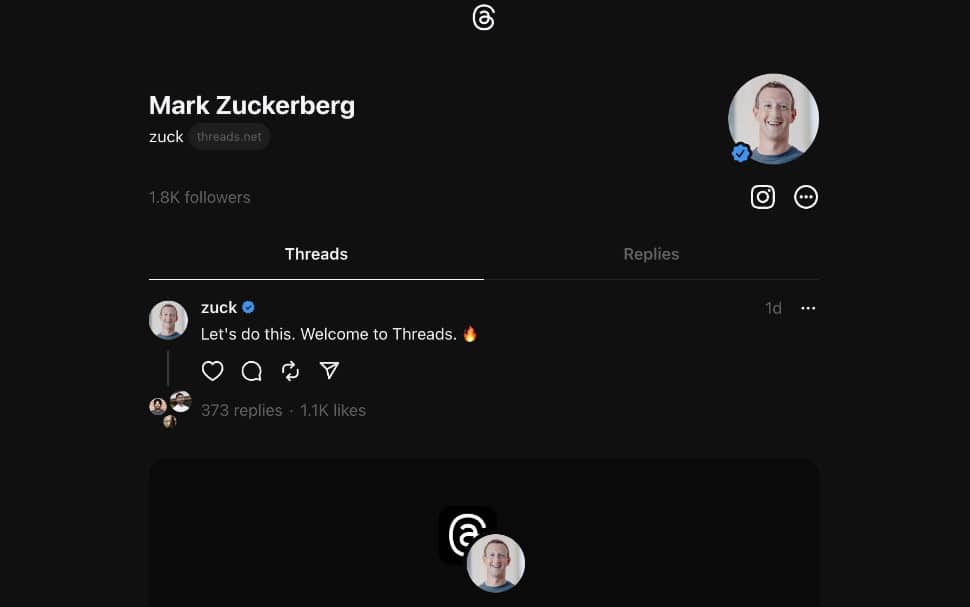
Also, note that you can read and view the content of only public profiles.
Ways To Use Threads
- The first way to use Threads is to create a separate Instagram account just for Threads.
- The second is to only view or read Threads posts through the official website, without the need for login or signup.
Note: We will keep this article updated as soon as we get any new updates from Meta on this process.
- Threads For PC Download
- How to Unhide Threads Badge on Instagram
- How to Get Verified On Threads
