Having multiple remotes for TV, DVDs, and cable box is too much of a hassle. This is why you got the GE Universal remote.
It will not work right out of the box. You must program GE universal remote codes to make it work with the TV, VCR, DVD player, or other supported equipment.
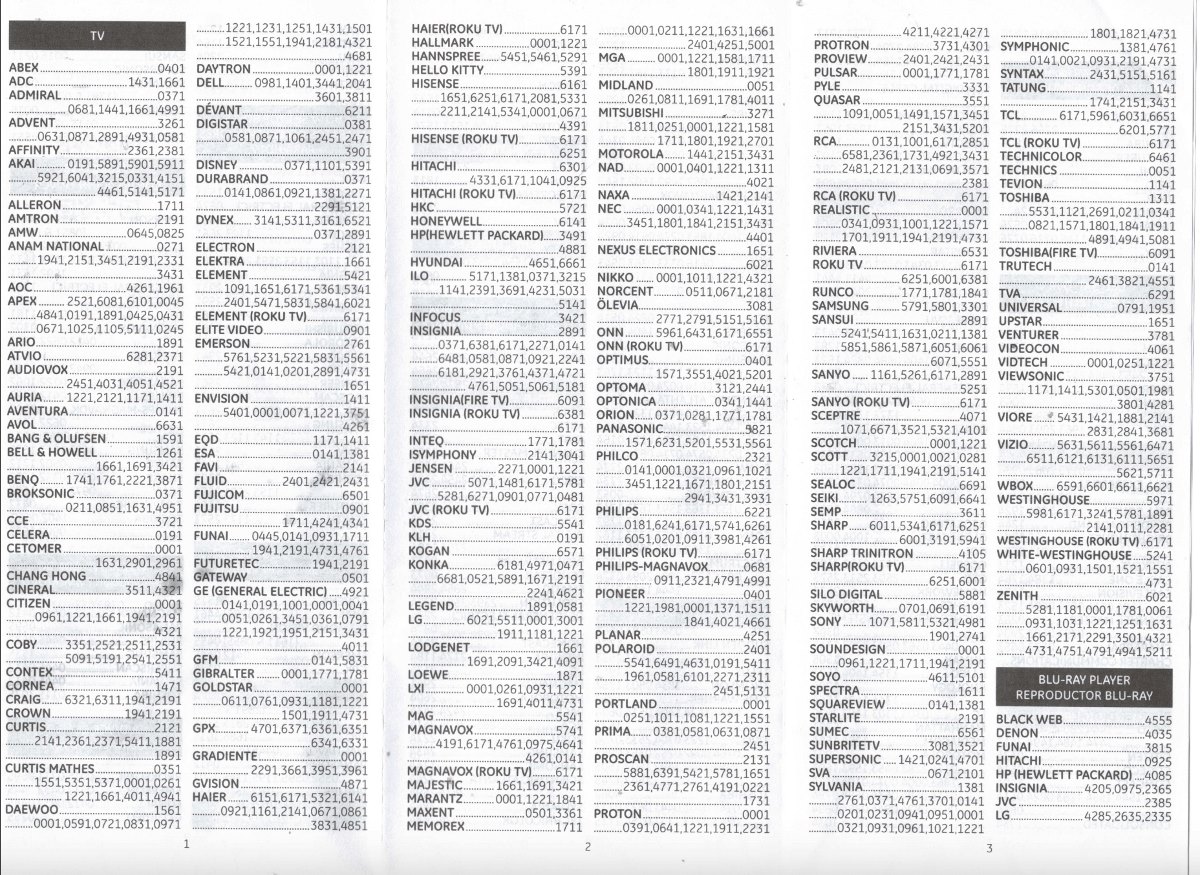
Here, we have the latest working GE universal remote codes list for all the leading brands from across the world.
Along with that, we will also help you program the GE universal remote at home. At tops, it takes two minutes to get it going.
- How to Program GE Universal Remote with Code
- GE Universal Remote Codes List
- GE Universal Remote Codes for DVD
- GE 2 Device Universal Remote Control Codes GE Universal Remote codes for Xbox GE Universal Remote Codes for Cable Box / Satellite
- How to Program GE Universal Remote Without Code How to program the GE universal remote without codes? How do I program my GE 6 universal remote without the code? My GE Universal remote code is not here
How to Program GE Universal Remote with Code
After you have brought the GE universal remote, here is how you can program it with or without the code.
- Turn on your TV using your regular remote.
- Press and hold the setup button on the remote until a red light appears on the on button.
- After that, press the TV button and release it
- Now, type the GE universal remote codes, referring to the table given below. It should start working after typing the code. If it is not working, then try another code as many brands have multiple remote codes.Note – Do not use space while typing the codes.
GE Universal Remote Codes List
| TV Brand | Codes |
|---|---|
| LG | CL3: 0001, 5511, 3001, 5501, 3021, 3091, 3221, 3281, 3311, 5271, 0131, 0251, 0611, 0761, 0931, 1181, 1221, 1471, 1501, 1911, 3811, 4731 CL4 / CL5: 6021, 0001, 5511, 3001, 1911, 1181, 1221 CL6: 6021, 5511, 0001, 3001, 1911, 1181, 1221 |
| Philips | 0181, 6221, 5741, 6051, 0201, 0911, 3981, 4261 |
| General Electric (GE) | 4921, 0141, 0191, 1001, 0001, 0041, 0051, 0261, 3451, 0361, 0791, 1221, 1921, 1951, 2151, 3431, 4011 |
| Philips Magnavox | 0681, 0911, 2321, 4791, 4991 |
| Philips Roku | 6171 |
| ONN | 5961, 6431, 6171, 6551 |
| ONN Roku | 6171 |
| Pioneer | 0401, 1221, 1981, 0001, 1371, 1511, 1841, 4021, 4661 |
| TCL | CL3: 2851, 0091, 1421, 1691, 1851, 2011, 2061, 2111, 2301, 3421, 3431, 3571, 4921 CL4 / CL5: 6171, 5961, 6031, 5771, 6201 CL6: 6171, 5961, 6031, 6651, 6201, 5771 |
| TCL Roku | 6171 |
| Radio Shack | 0001, 0341, 0931, 1001, 1221, 1571, 1701, 1911, 1941, 2191, 4731, 4921 |
| Sylvania | 1381, 2761, 0371, 4761, 3701, 0141, 0201, 0231, 0941, 0951, 0001, 0321, 0931, 0961, 1021, 1221, 1801, 1821, 4731 |
| Toshiba | 1311, 5531, 1121, 2691, 0211, 0341, 0821, 1571, 1801, 1841, 1911, 4891, 4941, 5081 |
| Anam National | 0271, 1941, 2151, 3451, 2191, 2331, 3431 |
| Insignia | CL3: 2891, 0371, 2271, 0141, 6171, 0581, 0871, 0921, 2241, 6181, 2921, 3761, 4371, 4721, 4761, 5051, 5061, 5181 CL4: 0921, 2891, 6171, 0371, 2271, 0141, 0581, 0871, 2241, 6181, 2921, 3761, 4371, 4721, 4761, 5051, 5061, 5181 CL5/CL6: 2891, 0371, 6381, 6171, 2271, 0141, 6481, 0581, 0871, 0921, 2241, 6181, 2921, 3761, 4371, 4721, 4761, 5051, 5061, 5181 |
| Proscan | 5781, 5421, 4191, 0221, 1651, 1731, 2131, 2141, 2361, 2371, 2381, 0261, 2061, 2301, 4011 |
| Emerson | 761, 5761, 5221, 5231, 5561, 5831, 4731, 5421, 5741, 0001, 0141, 1651, 0201, 0231, 0951, 1551, 5551 |
| Philco | 2321, 0141, 0001, 0321, 0961, 1021, 3451, 1221, 1671, 1801, 2151, 2941, 3431, 3931 |
| Insignia Roku | CL5: 6171, 6381 CL6: 6381, 6171 |
| JVC | 5071, 1481, 0311, 0481, 0771, 0901, 1281, 1801, 1911, 5281 |
| Lodgenet | 1661, 1691, 2091, 3421, 4091 |
| Goldstar | 0001, 0611, 0761, 0931, 1181, 1221, 1501, 1911, 4731 |
| Insignia Fire | 6091 |
| Gibraltar | 0001, 1771, 1781 |
| Sansui | 5411, 0211, 1381, 2891, 5241, 5851, 5861, 5871, 6051, 6061, 6071, 1631, 5551 |
| Runco | 1771, 1781, 1841 |
| Daewoo | 1561, 0001, 0591, 0721, 0831, 0971, 1221, 1231, 1251, 1431, 1501, 1521, 1551, 1941, 2181, 4321, 4681 |
| Apex | 6081, 6101, 0045, 4841, 2521, 0191, 1891, 0425, 0431, 0671, 1025, 1105, 5111, 0245 |
| Akai | 0191, 5891, 5901, 5911, 5921, 6041, 3215, 0331, 4151, 4461, 5141, 5171 |
| Vizio | CL3: 5631, 5561, 5611, 1471, 1741, 2021, 2901, 3651, 3741, 3851, 4081, 5571, 5581, 5591, 5601, 5621, 5641, 5651, 5661, 5671, 5681, 5691, 5701, 5711 CL4: 5611, 5631, 5561, 6121, 6131, 6111, 5651, 5621, 5711 CL6: 5631, 5611, 5561, 6471, 6511, 6121, 6131, 6111, 5651, 5621, 5711 |
| Scotch | 3215, 0001, 0021, 0281, 1221, 1711, 141, 2191, 5141 |
| Zenith | 6021, 5281, 1181, 0001, 1781, 0061, 0931, 1031, 1221, 1251, 1631, 1661, 2171, 2291, 3501, 4321, 4731, 4751, 4791, 4941, 5211 |
GE Universal Remote Codes for DVD
| Brand | Remote codes |
|---|---|
| Bose | 6170 |
| Philips | 6002, 6008, 6019, 6022, 6046, 6084, 6085, 6123, 6134, 6139, 6167, 6168, 6228, 6238, 6239, 6240, 6285, 6306, 6489, 6545, 6549 |
| Panasonic | 6001, 6002, 6011, 6026, 6090, 6096, 6097, 6103, 6113, 6121, 6216, 6229, 6233, 6471, 6490, 6520, 6544, 6557 |
| Sony | 6006, 6049, 6095, 6099, 6115, 6124, 6243, 6244, 6245, 6246, 6473, 6487, 6537, 6538, 6543 |
| Samsung | 6001, 6012, 6032, 6055, 6066, 6129, 6165, 6166, 6210, 6287, 6478, 6479, 6488, 6498 |
| HP | 6486 |
| Mitsubishi | 6003, 6098, 6126, 6485 |
| Toshiba | 6002, 6008, 6012, 6025, 6061, 6076, 6123, 6232, 6295, 6301, 6373, 6475, 6515, 6516, 6525, 6542 |
GE 2 Device Universal Remote Control Codes
GE Universal Remote codes for Xbox
| Streaming media player | 2824, 2134, 2144 |
|---|---|
| DVD | 0915 |
GE Universal Remote Codes for Cable Box / Satellite
| Brand | Remote codes |
|---|---|
| AT&T | 8088, 8206 |
| Century | 8003, 8016, 8056, 8113 |
| Dish | 8041, 8045, 8148, 8149, 8191, 8193, 8204 |
| DirecTV | 8018, 8021, 8023, 8024, 8028, 8034, 8035, 8039, 8040, 8042, 8043, 8044, 8046, 8063, 8109, 8110, 8111, 8139, 8153, 8172, 8178, 8179, 8181, 8184, 8185, 8196, 8199, 8201, 8202, 8203 |
| Comcast | 8088 |
| Charter | 8027 |
| Cogeco | 8088 |
| Sky Network | 8029, 8109, 8110, 8111, 8170, 8171 |
| ABC | 8002, 8003, 8014, 8048, 8049, 8050, 8051, 8052 |
| RCA | 8018, 8195, 8213, 8214 |
How to Program GE Universal Remote Without Code
If you want to program the GE universal remote without code, then follow this method.
- Turn on the TV using your regular remote.
- Long press the setup button until you see a red light on the remote.
- After that, press the TV button once.
- Next, press the power button once every 5 seconds. Do this until the TV turns itself off.
- Now, turn on the TV through the buttons on the TV unit.
- After that, the next channel button the button every three seconds, denoted by an upwards arrow.
- Turn on the TV and now use functions like volume and channel change to test your GE universal remote.
How to program the GE universal remote without codes?
To program a GE Universal Remote without a code, use the auto code search feature. This method involves holding the setup button until the TV Switch light stays on
After that, you have to select the device type and repeatedly press the power button until the device turns off. You can follow the entire method as given above.
How do I program my GE 6 universal remote without the code?
You can follow the method given above for programming universal remote without code. It is the same across different versions, barring minor changes.
My GE Universal remote code is not here
No worries, share your TV brand and we will get the codes for you at the earliest. Listing all the codes on one page is not possible. Hence, we kept the ones that are commonly asked by the readers.
Use the Right GE Universal Remote Codes
Make sure to use the right GE universal remote code, which works with your TV. Others may or may not work well.
You can always reset the remote by starting the programming method as we have discussed earlier.
