If you have recently updated Windows 11 to a newer version then you might have been greeted with some Chinese Characters On Lock screen of your Windows 11 PC.
Well, you are not alone thousands of Windows 11 users are facing the Start Screen Chinese Text Problem . Windows opens up an MSN page with Chinese stories and information when clicking on this Chinese Text.
RELATED: How to Disable Background Apps in Windows 11
Fix Chinese Letters On The Lock Screen
At the time of writing this article, the origin of this problem is unclear, however, many users have suggested that the bug came into existence after a Windows 11 Update.
To fix this problem follow the steps mentioned below,
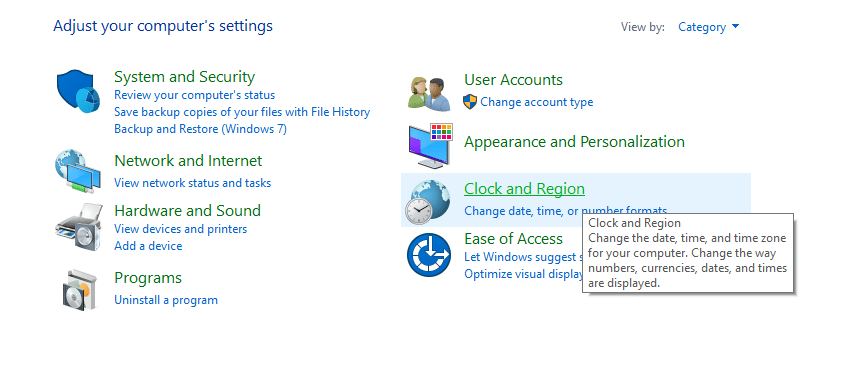
STEP 1: First, open the Control Panel , using the keyboard shortcut Win+R and type Control.
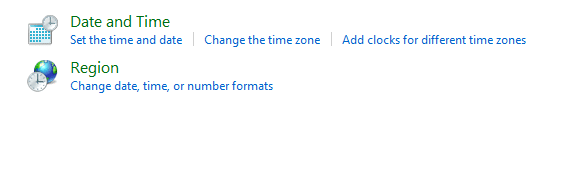
STEP 2: Locate and open the Clock and Region section, and press Region .
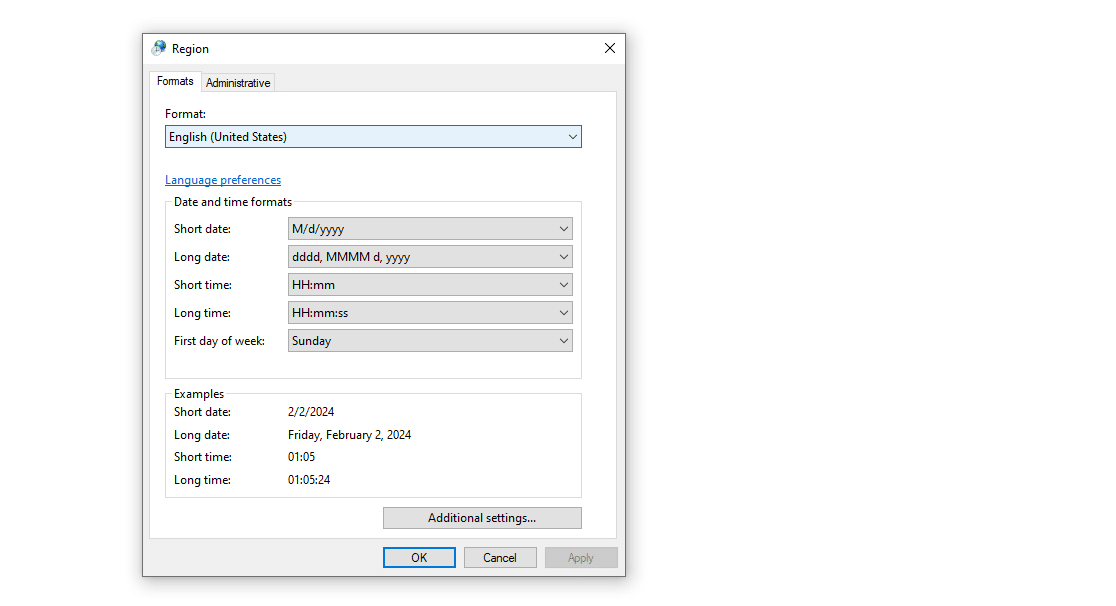
STEP 3: Now change the Format to your actual region, so English (United States).
Once that’s done press ok and restart your PC. If everything goes well the issue should get fixed for you instantly. Additionally, if you are reading this article at a later date, then updating Windows 11 can also resolve the problem.
CONCLUSION
So this was an easy solution for Windows Lock Screen In Chinese issue. If we find any other new solution we will add it to the article.
